Built by a humanitarian field practitioner

Opti', the MEAL platform all in one for humanitarian teams

Three AI modules cover the whole MEAL cycle: design your tools with OptiBot, run your assignments, collections and analyses with Opti Gemba, build your skills with Opti Academy. Works with KoboToolbox, ODK and XLSForm, online and offline.

KoboToolbox · ODK · XLSForm · 120+ languages · GDPR compliant

A complete PDM, disaggregated and ready for Kobo, in minutes. Decisive for emergency deployments.

MEAL Manager, international NGO

At last a tool that covers the whole cycle: from questionnaire to report, without juggling ten pieces of software.

Programme Coordinator, West Africa

My junior team learns in Opti Academy and applies it straight away in Opti Gemba. Very practical.

Independent M&E consultant

The ecosystem

One thread, from the need to the deliverable

Opti' connects design, collection, analysis and learning. Your project information is entered once, then reused automatically in every terms of reference, questionnaire, analysis and report.

🧮 In Excel too The Opti' add-in, validated on Microsoft AppSource, analyses your datasets inside your own spreadsheet. See the add-in
ModuleOptiBot

The MEAL-specialised AI assistant

Ask your methodology questions, generate XLSForm questionnaires in plain language, and produce contextualised professional documents. OptiBot knows the sector standards (CHS, SPHERE, OECD-DAC) and what donors expect (ECHO, BHA, USAID, FCDO).

  • XLSForm generation ready for Kobo and ODK: choice lists, constraints, calculations, skip logic, multiple languages.
  • Structured methodological guidance : SMART indicators, logical framework, theory of change, sampling.
  • Documents generated from a form : terms of reference, methodologies, recommendations, contextualised rather than generic.
  • Personal library : import your own guidelines and OptiBot answers against them, in line with your procedures.
  • Exchanges encrypted at rest, with the key stored separately, GDPR compliant.
PDMBaselineEndline KAPFGD guideKIINeeds assessment
See the OptiBot page
OptiBot conversation
OptiBot avatar OptiBot
Online · MEAL specialist
Create a PDM for an NFI kit distribution to 500 displaced households in DRC, disaggregated by sex and status.
I am generating a structured PDM: household identification, receipt verification, item quality & quantity, satisfaction, complaints (AAP), disaggregation by sex and age.
Format type / name / label XLSForm compliant, ready for KoboToolbox.
typenamelabel
begin_grouphh_infoHousehold identification
select_onegender_hohSex of head of household
select_onedispl_statusDisplacement status
select_multipleitems_missingMissing items
ModuleOpti Gemba

Run your MEAL assignments end to end

One project, one or more assignments. Opti Gemba chains terms of reference, questionnaire, collection, analysis and report, with an integrated logical framework, a Gantt chart and granular role management. Every indicator is tied to a MEAL activity, so nothing is forgotten at reporting time.

  • Robust offline collection : fill forms with no network, with automatic sync when the connection returns.
  • Automatic analysis : cross-tabulations, disaggregation up to two levels, AI interpretation, 120+ languages.
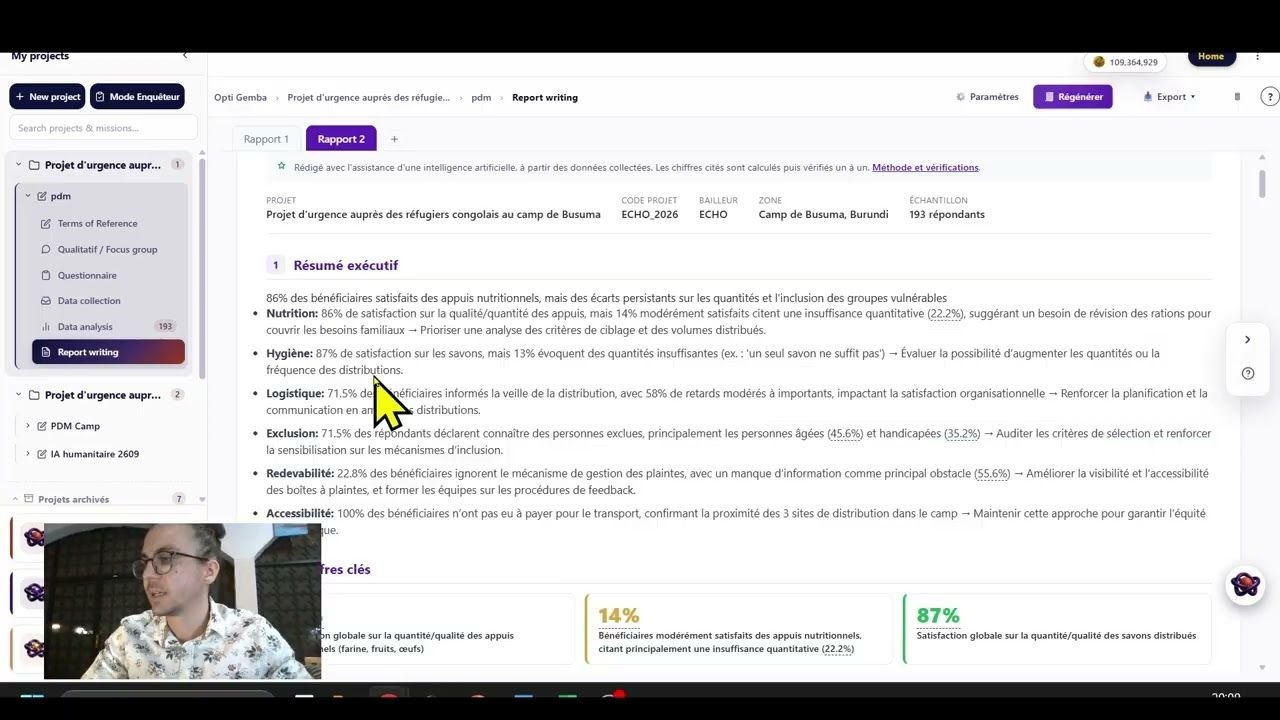
  • Final narrative report exportable to PowerPoint, PDF or HTML, ready to present.
  • Roles & permissions : admin, enumerator, analyst, form builder, read only, to keep the data safe.
BaselineMidlineEndlinePDM Final evaluationSatisfactionDQANeeds assessment
See the Opti Gemba page
The flow of a MEAL assignment
1

Terms of reference

Generated from the project record and the assignment settings.

2

XLSForm questionnaire

Editable in plain language through the chat.

3

Preview & test

Check skip logic, constraints and instructions.

4

Online / offline collection

A shareable link or the mobile app, with automatic sync.

5

Dataset (.xlsx)

Downloadable, compatible with your existing tools.

6

AI disaggregated analysis

Tables, charts, findings and recommendations.

7

Narrative report

Exported to PowerPoint, PDF or HTML.

ModuleOpti Academy

Build your skills, at your own pace

Not another MOOC. The AI builds a four to eight step path adapted to your role, your country and your objectives, and keeps your context in memory from one step to the next, so that everything transfers straight to the field.

  • Personalised paths : lesson, field example, exercise, open reflection and detailed AI feedback.
  • Active memory of your context : your real case is reused in the examples, exercises and corrections.
  • 150+ modules : MEAL fundamentals, survey methods, sectors, donors, data ethics, soft skills.
  • Cloud sync : start on a computer, carry on from your phone in the field.
M&E coachingOnboardingCase studiesTailored paths
See the Opti Academy page
A path adapted to you
Your context
Refugee camp · Mali · cash intervention · junior MEAL Officer
1
Lesson
SMART indicators for cash
2
Field example
A PDM in a Sahel camp
3
Exercise
Write three indicators for your project
4
AI feedback
Detailed marking & ways to improve
🧮 Also in the range

Analyse your data straight inside Excel

The Opti'add-in, validated on Microsoft AppSource, brings AI-assisted analysis into your spreadsheet: cross-tabulations with no manual work, narrative interpretation, and a quick read of a Kobo or partner dataset. Available in around ten interface languages.

CountifAverageifValue Scale
.xlsx
Import your dataset, get the analysis
  • Analysis tables in a few clicks
  • AI interpretation, ready for the report
  • Disaggregated comparisons between groups
Security & confidentiality

Your sensitive data deserves a private AI

Working with vulnerable populations allows no compromise. The Pro plan includes OptIA, a private artificial intelligence for the most sensitive data: testimonies, protection data, incident reports.

Entirely private AI

A dedicated GPU container. No third-party AI provider: no OpenAI, no Anthropic, no Google.

Purged after every request

Processing happens in memory. No data is stored on the infrastructure.

End-to-end encryption

TLS 1.3 and AES-256. SOC 2 Type II certified hosting.

GDPR compliant

Servers in Europe, encryption at rest, and the encryption key stored separately.

OptIA is included in the Pro plan. Details in the privacy policy.

Pricing

Start free, move to Pro when you are ready

The Demo version is free and carries no commitment, so try it with your real data. The plans run on a token system (the AI « consumption » unit), which you can also earn for free. And for its first anniversary, until 8 October 2026, Opti' is opening 14 days of full access, with no card.

Starter

9€/ month

or €99 / year −8%

100,000 tokens / month · ideal for advanced individual use.

  • Unlimited OptiBot
  • Full questionnaire generation
  • Full data collection
  • Full automatic analysis
  • Unlimited data analyses
  • Narrative report (PPTX / PDF / HTML)
  • Data cleaning
  • Personal library 3 docs
  • 120+ languages · Kobo compatible
  • OptIA, private AI
Start with Starter

Teams Organisations

99€/ month

or €699 / year −41%

1,000,000 tokens / month · the largest volume, built for teams and organisations.

  • Everything included in Starter
  • 1,000,000 tokens / month : ten times the Starter volume
  • Run several assignments in parallel
  • Built for teams & organisations
  • Team onboarding & deployment at scale
  • OptIA, private AI (included in Pro)
Discover Opti' Teams

Pro

99€/ month

or €950 / year −20%

300,000 tokens / month · everything in Starter, with OptIA included.

  • Everything included in Starter
  • Personal library 10 docs
  • OptIA, private AI:
Private server OptIA Online Private AI for sensitive data
Our commitment No data retained. Your AI, entirely private.
TLS 1.3 + AES-256 encryption SOC 2 Type II certified hosting
Move to Pro
Free to start

Create your account for free

Get into Opti' on the Demo plan: no card required, and receive 30,000 free tokens to explore the tool. You can also earn more, free, every day. Understand tokens and how to get them →

📌 Plan details, the comparison and checkout are on the pricing page, also reachable from the application (the « Upgrade » button). To equip a whole organisation, see Opti' Teams or contact us.
The team behind Opti'

Born from eight years of humanitarian field work

Opti' is published by Thomas LEQUEUX Consulting. Its founder has held every level of the MEAL function, from volunteering to programme coordination, in emergency response as much as in long-term projects. Every design choice, offline robustness, simplicity, attention to donor constraints, comes from that experience.

Beyond the platform, the practice supports NGOs on:

  • MEAL strategy consulting (logical frameworks, theories of change, accountability)
  • Humanitarian AI policies & SOPs, GDPR and Do No Harm compliant
  • Capacity building (tailored training, coaching)
  • Bespoke digital tools (Excel add-ins, chatbots, dashboards)
See the consulting offer
Field career
  • 2018Volunteering · Madagascar & Ivory Coast
  • 2021MEAL Volunteer · Congo
  • 2022MEAL Officer · Sudan
  • 2023MEAL Manager · Ukraine
  • 2024Programme Coordinator · Central African Republic
  • 2025Quality & Development Coordinator · Burundi
FAQ

Frequently asked questions

What is MEAL in humanitarian work?
MEAL stands for Monitoring, Evaluation, Accountability and Learning . It is the standard framework NGOs use to steer, evaluate and improve their projects, guarantee accountability to the people they assist and to donors, and build on what they learn. Read our full guide: what is MEAL?, see also our guide to humanitarian action.
What is Opti' and what does the platform contain?
Opti' is an all-in-one MEAL platform for humanitarian work, built around three modules: OptiBot (AI assistant, XLSForm and methodology), Opti Gemba (full assignment management, online and offline collection, analysis and reports) and Opti Academy (AI-personalised training). An Excel add-in published on Microsoft AppSource is also available.
What is the difference between OptiBot, Opti Gemba and Opti Academy?
OptiBot is the design & advice layer (methodology, XLSForm, documents). Opti Gemba is the operational layer (projects, assignments, collection, analysis, reports). Opti Academy is the learning layer (AI learning paths). All three share the same project data and the same standards.
Is Opti' compatible with KoboToolbox and ODK?
Yes, in two ways. Opti' connects directly to your KoboToolbox account : the questionnaire is deployed there in one click and the submissions come back into Opti' for analysis, with live collection tracking if you want it. Opti' also generates and exports questionnaires in the XLSForm standard (.xlsx), ready to upload to KoboToolbox, ODK Collect, SurveyCTO or any XLSForm-based tool. Collected datasets also export to .xlsx so they fit your existing tools (Power BI, Tableau and the rest).
Can data be collected offline?
Yes. Opti Gemba supports offline collection through the Android mobile app: the questionnaire is downloaded onto the device, filled in with no connection, and the submissions sync automatically as soon as the network comes back, which is a hard requirement in humanitarian contexts.
Does Opti' work in French?
Yes, in French, English, Spanish, Arabic, and more than 120 languages for analysis. You can also generate multilingual questionnaires (FR / EN / AR, for example) in a single request.
Is my data secure? And what is OptIA?
Data and conversations are encrypted at rest, with the key stored separately, on servers in Europe, GDPR compliant. The Pro plan includes OptIA, a private AI on a dedicated GPU container: no third-party AI provider, processing in memory, purged after every request, TLS 1.3 + AES-256 encryption. One piece of advice: never share personally identifiable information (PII) you do not need to share.
What is a token, and can you get them for free?
Tokens are the unit of AI « consumption »: every question, questionnaire generation, analysis or report uses a small part of them. Each plan includes a monthly quota (Demo: 30,000 free tokens ; Starter: 100,000/month; Pro: 300,000/month; Teams: 1,000,000/month). You can also earn them free every day : a daily sign-in, sharing an article or an Opti' page on LinkedIn, and level bonuses. Everything about tokens →
How do you get to Opti'?
From any browser at myoptibot.com/app, as an Android mobile application (Google Play, or installed directly from the browser), and as an Excel add-in through Microsoft AppSource.
How is this different from ChatGPT for MEAL?
Opti' is specialised in humanitarian MEAL : it knows the standards (CHS, SPHERE, OECD-DAC, AAP) and what donors expect, produces XLSForms you can use as they are, and covers the whole cycle (design, collection, analysis, reporting, training). A general-purpose assistant gives vaguer answers and demands expert prompting.
Resources

MEAL guides & resources

Free reference guides, written by a practitioner in the sector, to master monitoring and evaluation and its tools.

Ready to change how you do MEAL?

Open Opti' now. No installation, no card.